Contents
Introduction
Current students, staff, and faculty are automatically added to relevant notification groups, including:
- Student home location.
- Any locations where you take or teach on-ground classes.
- Your work location.
You can opt in to additional alert groups to ensure that you stay informed about emergencies for all your locations.
Step 1: log in to Rave
Log in to your VSC Rave account. Rave uses the familiar Single Sign-On VSC login page.
Step 2: agree to the terms of use
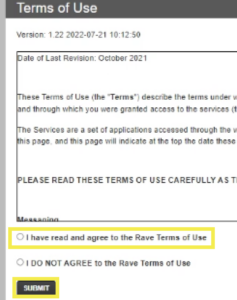
If it is your first time logging in to Rave, then you will have to agree to the terms of use.
Select the radio button, “I have read and agree to the Rave Terms of Use,” and click the submit button.
Step 3: select additional lists
Select “Opt-In Lists” from the top of your screen.

Opt-in lists work alongside automatically generated lists. For example, even if you’re not subscribed to the opt-in list for your home location, you’ll still get alerts because current students are added to lists for their primary home location.
Choose all campuses
We encourage everyone to select your home campus and every other campus you travel to in order to stay informed in case of an emergency.
Check the checkbox in the Subscribe column for each list you would like to receive updates for.
Changes made within this page save automatically. There is no save button to click. You can verify that your changes were saved by refreshing the web page.
Bonus instruction: verify your phone number
This is also a good opportunity to verify your cell phone number if you have not done so already. The banner will be red at the top of the Rave portal asking to verify your phone number. Select the button to verify your number.

If you have any trouble you can reach out to VTSU Public Safety or contact the Helpdesk.