Vermont State Colleges students, faculty, and staff have access to numerous printers on campus. Whether you are at a Community College of Vermont academic center or one of the Vermont State University campuses, there is likely a printer close by!
Printers on campus are generally associated with nearby computer labs. When you log into one of those computers the nearest printers will be available automatically. Faculty and Staff computers are configured to connect to their closest printers as well. Printing from personal devices is not supported at this time.
Follow Me Printing
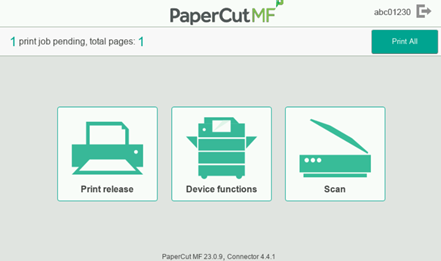
Copiers at Vermont State University utilize “Follow me Printing”, a system that securely stores print jobs until you release them at the copier. When you’re ready to release your stored print job just walk to any copier on campus and use the touchscreen to log in using your 7-digit college ID number. Your ID number can be found on a number of documents, including your college ID—for more information on finding your ID number check out our support article or give the Helpdesk a call.
Once logged into the copier you will be able to release your stored print jobs as well as use the “scan to email” functionality. The default “Scan” option will automatically send scanned documents to your VSC email account. To send a scanned document to a different email address choose the “Device Functions” option, then select the scan option from that page.
Web Print
Web Print allows you to print from your personal computer instead of needing to use a lab computer. You must be on campus connected to the VSC wifi network in order to access Web Print. Only the “Follow Me” copiers are available in Web Print, so if you’d like to print to a non-copier device you must use the nearest lab associated with that device.
To begin, open a web browser, navigate to https://print.vsc.edu, and sign in using your VSC credentials. Once signed in click the Web Print option, located at the bottom of the menu on the left. Click the “Submit Job” button, then select either the color or black and white copier on your campus. Note that jobs sent to the black and white copiers can be released on any copier on that specific campus, while jobs submitted to the color copiers can only be released on the limited number of color copiers. After entering the number of copies you would like you will finally be given the option to upload your documents. Upload your desired print jobs, and after clicking submit your job will be held until you release it at your desired copier.
Having trouble?
If you are having trouble printing at your academic center or campus please contact the Helpdesk by phone or by creating a ServiceDesk ticket using the button below.
We would love to hear from you
As we continue to improve the VSC IT support site, we would love to get your feedback. Please sign-in to the feedback form linked below to share your thoughts.